The single draw gives you time to read one card. The pack gives you ten to compare. Here is how to get something out of both.
01 / SINGLE
Take the first draw
Open the player and wait for the collection status to settle. When the single draw says Ready, choose Draw 1 free card. When the card appears, click it once to turn it over and again to keep it. Look for the level name under Recent collection. That entry gives you a way back to the level even after the reveal has closed.
02 / PACK
Open all ten
Choose Open 10-card collection pack. The shuffle is part of the reveal. Use Skip reveal if you want to inspect the results straight away. Read the highlighted card first, then scroll down to the pack list. The smaller cards belong to the same opening and can be more interesting than the headliner.
03 / ALBUM
Revisit a level
Choose Back to draw to return to the daily screen. Find a name in Recent collection and open its profile. If a friend mentions a level later, the card name is a better starting point than its border color. Several different levels can share a rarity, even within one pack.
FROM THE PLAYTEST
Inside two real pulls
These examples come from the embedded Extreme Demon Gacha player. The cards pictured belong to separate browser sessions.
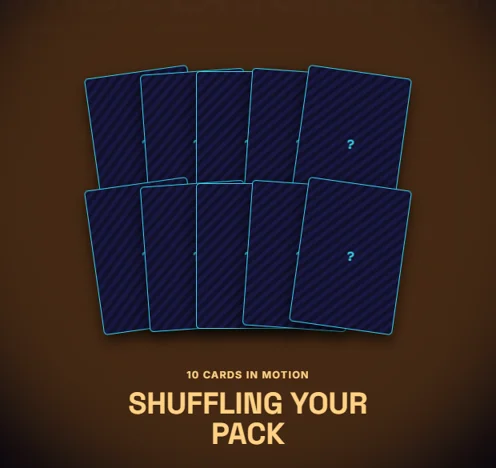
The ten-card reveal before the faces turn over.
A single, then a full pack
Our first single draw produced Subterminal Point, marked Uncommon and ranked #40 in the player. The collection moved to 1/100. One detail is easy to miss here. The single draw was marked claimed, but the ten-card button was still available. You can use both actions in one visit.
The pack added ten distinct levels in that run. Among them were Acheron at #27, Thinking Space II at #4 and Artemis 13 at #2. The counter reached 11/100. We refreshed the host page, opened the player again in the same browser context and saw the same count and recent pulls. Eleven was the outcome of this particular opening. Duplicates can change how much the counter grows.
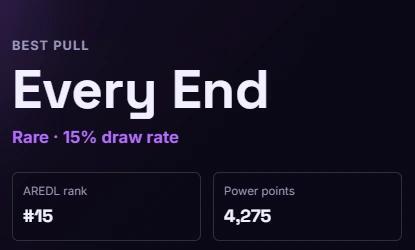
Every End on the results screen of a separate ten-card draw.
Look past the featured card
In another session the Extreme Demon Gacha results screen featured Every End. Its panel showed Rare, #15 and 4,275 power points. Further down the very same pack was ORBIT, listed at #9 with 4,552 points. If you only save the featured card, you can overlook a level with a smaller rank number or more points.
Try a small challenge with your next pack. Before you close the results, pick three different favorites: the name you recognize, the lowest rank number, and the level whose profile you most want to read. Sometimes one card takes all three spots. In this example the featured level and the lowest rank were two different answers.
CARD ANATOMY
Read the face of a card
Rank, rarity and power
Start with the name. An Extreme Demon Gacha card stands for a Geometry Dash level. The number after the hash identifies its placement in the list snapshot used by this player. In our two examples Artemis 13 carried #2 and Subterminal Point carried #40. Owning either card records a collectible. A Geometry Dash completion would require actually playing the level.
Next read the tier printed on the card. It groups cards for the draw. In the Every End reveal, the percentage appeared beside the word Rare. The player describes its draw as picking a rarity and then a card from that group. A percentage next to Rare belongs to the group. Pulling one particular named level requires both steps to land in its favor.
What the guarantee gets you
In this daily Extreme Demon Gacha edition, a ten-card pack guarantees at least one Rare or Legendary. The wording matters when setting a goal. A pack with one Rare and no Legendary satisfies the guarantee. A pack with several Rare cards also satisfies it. It gives you a reason to open the pack even if your single draw landed on a Common.
For a collection goal, decide whether you care about new names or tiers before pressing Open. A duplicate Legendary could be the best-looking pull of the evening while adding nothing to the number of distinct levels you own. Conversely, a new Common can fill an empty slot. Check the album counter and the results together to see which kind of progress you made.
AT THE TABLE
Collector questions
Which Extreme Demon Gacha am I playing?
This is the daily, browser-saved fan simulator with a single draw and a ten-card pack. Several games use the Extreme Demon Gacha name. If another guide describes five cards, a pack timer measured in minutes or an account-based trading inventory, it is describing a different edition. The quickest way to identify this one is to look for the two daily status labels above the draw area.
Can I keep the same collection tomorrow?
Return in the same browser profile on the same device and use the same game entry. In our embedded session the collection survived a refresh. Private windows, clearing site data, or moving to another browser can give you a fresh collection. If your browser separates storage for an embedded game and its standalone page, the two views can also show different counts. Stick to the view where you began.
Why are the draw buttons already claimed?
Each calendar day has two collection actions in this Extreme Demon Gacha player. Once a single or pack has been claimed, that button shows its used state. Reloading is useful when the frame has failed to load, but our refresh kept both actions marked as used. While you wait, open a card profile from your recent list and compare its rank with another card you own.
How do I check a level or keep a record of a pull?
Use the profile for the specific card you drew. Look for the level’s name, rank snapshot and available verification link if you want to see the actual course. For a simple personal log, save the card name, displayed rank, rarity and source of the pull together. That is enough to distinguish a single from a ten-card result and to recognize an old favorite if the ranking changes later.
How can I tell whether my last pack had duplicates?
Read the number of collected levels before opening the pack and again after the results settle. Suppose an Extreme Demon Gacha collection starts at twelve and ends at twenty after a ten-card draw. Eight different names were new to that album. The other two slots either matched cards already owned or repeated a name drawn earlier in the same pack. The counter alone cannot tell you which names repeated. Use the list of ten results for that part. This is a worked example; our first recorded pack added all ten names.
What should I do if the player is blank?
Use Reload player under the game and give the embedded page a moment to finish loading. If it still stays blank, the new-tab option opens the same simulator directly. Before changing settings or clearing anything, check whether you already have a collection in this browser. Clearing its data can remove the very cards you are trying to recover.